Controlled Component vs Uncontrolled Component
코드숨 과제를 진행하면서 처음 작성했던 코드를 useRef()를 사용한 코드로 수정하려다가 useRef()가 어느 케이스에 사용되는지 정확히 알고 있는가란 질문을 받았다.
처음 작성했던 코드는 다음과 같이 상태를 이용해서 input 엘리먼트의 value를 관리하던 코드다.
// Controlled Component
const TodoForm = ({ onSubmit }) => {
  const [title, setTitle] = useState('');

  const handleChange = (e) => {
    setTitle(e.target.value);
  };

  const handleSubmit = (e) => {
    e.preventDefault();
    onSubmit(todoTitle);
    setTitle('');
  };

  return (
    <form onSubmit={handleSubmit}>
      <input
        type="text"
        value={title}
        onChange={handleChange}
      />
      <button type="submit">추가</button>
    </form>
  );
};
위의 코드를 다음과 같이 useRef()를 사용한 코드로 바꾸려고 했었다.
// Uncontrolled Component
const TodoForm = ({ onSubmit }) => {
  const inputRef = useRef();

  const handleSubmit = (e) => {
    e.preventDefault();
    onSubmit(inputRef.current.value);
    e.target.reset();
  };

  return (
    <form onSubmit={handleSubmit}>
      <input
        ref={inputRef}
        type="text"
      />
      <button type="submit">추가</button>
    </form>
  );
};
두 방법 중에 어느 방법이 나은지 리액트 공식 문서를 보면 Controlled Component, 즉 처음의 방법을 권장한다. 그 이유에 대해서는 다음 글이 많은 도움이 됐다.
https://goshacmd.com/controlled-vs-uncontrolled-inputs-react/
Controlled and uncontrolled form inputs in React don't have to be complicated - Gosha Arinich
There are many articles saying you should use setState, and the docs claim refs are bad. So contradictory. How are you supposed to make forms?
goshacmd.com
핵심만 정리하자면,
- 내가 작성한 코드에서 처음에 title이 ''(빈 문자열) 일 때,
- 사용자가 a를 입력하면, handleChange가 호출되면서 a를 얻고
- setTitle을 호출함으로써 리렌더링이 일어난다.
이건 가장 일반적인 React Way라 할 수 있다.
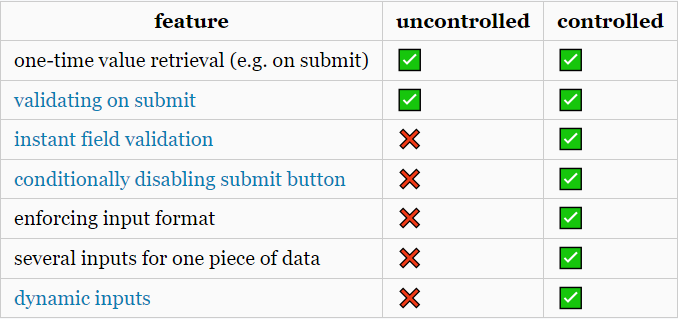
이런 흐름을 통해 상태와 UI는 항상 동기화되는데, 이는 입력 값의 변화에 즉각 반응할 수 있다는 의미로, 입력과 동시에 올바른 값인지 검증해서 피드백을 주거나, 입력값이 비었다면 버튼을 비활성화하는 등의 처리를 할 수 있다. 표로 정리하면 다음과 같은 차이가 있다.
결론은 매우 간단한 기능을 만드는 특별한 경우를 제외하고는 Controlled Component를 쓰는 게 더 낫다.
간단한 회고
원래는 개발할 때 오늘처럼 애매한 부분이 나와도 대충 생각하고 넘겼는데, 코드숨과 TIL 작성을 시작하면서 그 이유에 대해 찾아보려고 노력하고 있다. 순간에 그치는 것이 아니라 습관이 되도록 노력하자.
'TIL' 카테고리의 다른 글
| TIL - 20220621 (0) | 2022.06.22 |
|---|---|
| TIL - 20220620 (0) | 2022.06.21 |
| TIL - 20220616 (0) | 2022.06.17 |
| TIL - 20220615 (0) | 2022.06.16 |
| TIL - 20220614 (2) | 2022.06.15 |